As a gamer balancing work family and life understanding your internet connection is crucial for peak performance and enjoyment. Many wonder does internet upload speed affect gaming experiences particularly in competitive online titles or when streaming. This comprehensive guide dives deep into the often-overlooked aspect of upload speed explaining its role in lag hit registration voice chat and even screen sharing with friends. We will explore how different upload speeds impact various gaming scenarios from fast-paced FPS battles to cooperative PVE adventures ensuring you optimize your setup without unnecessary spending. Learn practical tips to assess your current speed troubleshoot common issues and make informed decisions about your internet plan so you can focus on building skills socializing and simply having fun. Discover why a balanced connection not just high download is key to a smooth frustration-free gaming session that fits seamlessly into your busy life. No more guessing just clear actionable insights for every gamer.
Does upload speed matter for online gaming?
Yes, absolutely. While download speed gets you the game data, upload speed sends your actions back to the server. Without sufficient upload, your commands like movement, shooting, or using abilities will be delayed, leading to frustrating lag, desynchronization, and a poor competitive edge. This is crucial for real-time multiplayer titles where every millisecond counts.
What is a good upload speed for competitive gaming?
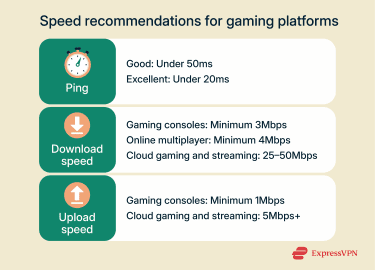
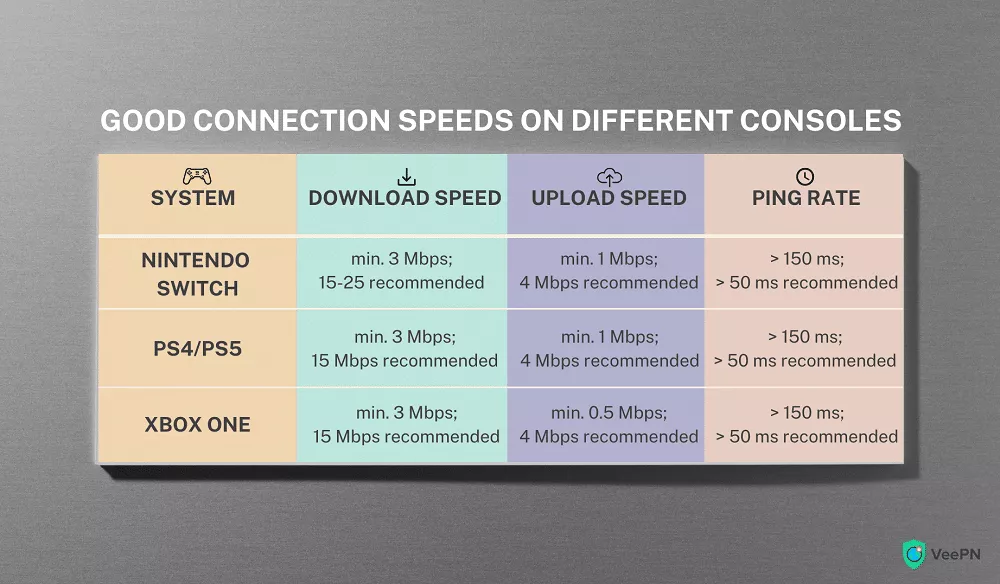
For most standard online gaming without streaming, an upload speed of 1-5 Mbps is generally considered adequate. However, for highly competitive games, larger lobbies, or if you also use voice chat extensively, aiming for 5-10 Mbps provides a much more stable and responsive experience. More is always better, but there's a point of diminishing returns.
How can I improve my gaming upload speed?
First, always use a wired Ethernet connection instead of Wi-Fi. Second, close any unnecessary background applications or downloads that might be consuming bandwidth. Third, check if your router's firmware is up to date and consider quality of service QoS settings if available on your router to prioritize gaming traffic. Minimizing other devices' internet usage during peak gaming times also helps.
Does low upload speed cause lag in games?
Yes, definitely. Low upload speed is a primary cause of input lag and desynchronization in online games. Your gaming device sends crucial data like your character's position, actions, and commands to the game server. If this data is transmitted too slowly due to insufficient upload bandwidth, your actions appear delayed on the server, resulting in noticeable lag for you and other players.
What's the difference between upload and download speed for gamers?
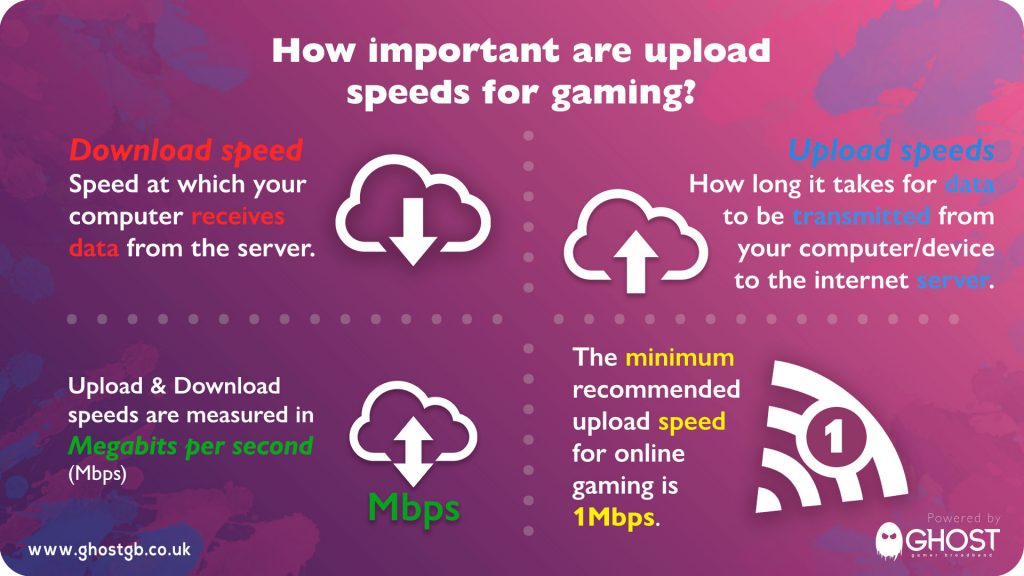
Download speed is how fast your device receives data from the internet for tasks like loading game assets, streaming, and receiving updates. Upload speed is how fast your device sends data to the internet, crucial for transmitting your in-game actions, voice chat, and streaming your gameplay. Both are vital, but upload is specifically for your outgoing game commands and communication.
Will low upload speed affect my voice chat while gaming?
Yes, definitely. Voice chat applications like Discord, built into games, or party chats rely heavily on upload speed to transmit your voice data to other players. If your upload speed is too low, your voice might sound choppy, robotic, or cut out entirely, making communication difficult and frustrating for your team. This is a common complaint for busy gamers trying to coordinate.
How does streaming gameplay impact my required upload speed?
Streaming your gameplay to platforms like Twitch or YouTube significantly increases your upload speed requirements. Depending on your desired resolution and framerate 720p 30fps to 1080p 60fps you will need anywhere from 5 Mbps to 20+ Mbps of stable upload speed in addition to what the game itself needs. High-quality streaming demands considerable bandwidth.
Can my router or Wi-Fi connection limit my effective upload speed for gaming?
Yes, absolutely. Even if your internet plan offers high upload speeds, an outdated router, a weak Wi-Fi signal, or significant network congestion on your home network can severely throttle your effective upload speed. A wired Ethernet connection is almost always superior for gaming, offering lower latency and more consistent speeds than Wi-Fi.
Ever found yourself perfectly lined up for a crucial shot in your favorite online shooter, only for the game to stutter, your character to teleport, or your voice chat to cut out? It is frustrating, especially when you are trying to unwind after a long day or squeeze in some quality time with friends online. Many of us, part of the 87 percent of US gamers who regularly play and average over 10 hours a week, know the pain of internet issues disrupting our precious gaming sessions. We often focus heavily on download speed, thinking more megabits per second going into our console or PC means a flawless experience. But there is a crucial, often overlooked player in this game of online connectivity: upload speed.
The big question many busy gamers are asking is, does internet upload speed affect gaming performance, especially when juggling family, work, and precious free time? Absolutely it does, and often in ways you might not immediately realize. From ensuring your character movements register instantly on the server to maintaining crystal-clear communication with your squad on Discord, your upload speed plays a silent but significant role. This guide is designed for you, the everyday gamer who values performance, fun, and wants to optimize their setup without diving deep into complex tech jargon or breaking the bank. We will break down exactly what upload speed is, how it impacts your game, and practical steps you can take to ensure your connection is up to par, letting you get back to building skills, enjoying social play, and maybe even dominating the leaderboards.
What Exactly Is Upload Speed and How Does It Differ From Download?
Think of your internet connection like a two-lane highway. Download speed is the lane bringing data to your device from the internet. This is what you use to load webpages, stream movies, and download game updates, which for many gamers, especially those on mobile or cross-play setups, is the primary focus. Upload speed, on the other hand, is the lane sending data from your device out to the internet. When you send an email, post a photo, or, crucially for our topic, play an online game, you are using your upload speed. Both are measured in megabits per second Mbps, but they serve distinctly different purposes.
Does Internet Upload Speed Affect Gaming Performance Directly?
Yes, unequivocally, does internet upload speed affect gaming performance. While download speed is essential for receiving game world updates, upload speed is critical for sending your game commands to the server. Every button press, joystick movement, and ability activation needs to be transmitted quickly and reliably. A low upload speed creates a bottleneck, delaying these vital signals. This delay manifests as lag, making your character feel unresponsive, causing desynchronization where what you see on your screen does not match the server's reality, and can severely impact hit registration in fast-paced titles. This directly impacts your ability to compete and enjoy the game, especially if you are among the 60 percent of gamers who play online regularly.
How Much Upload Speed Do I Really Need for Online Gaming?
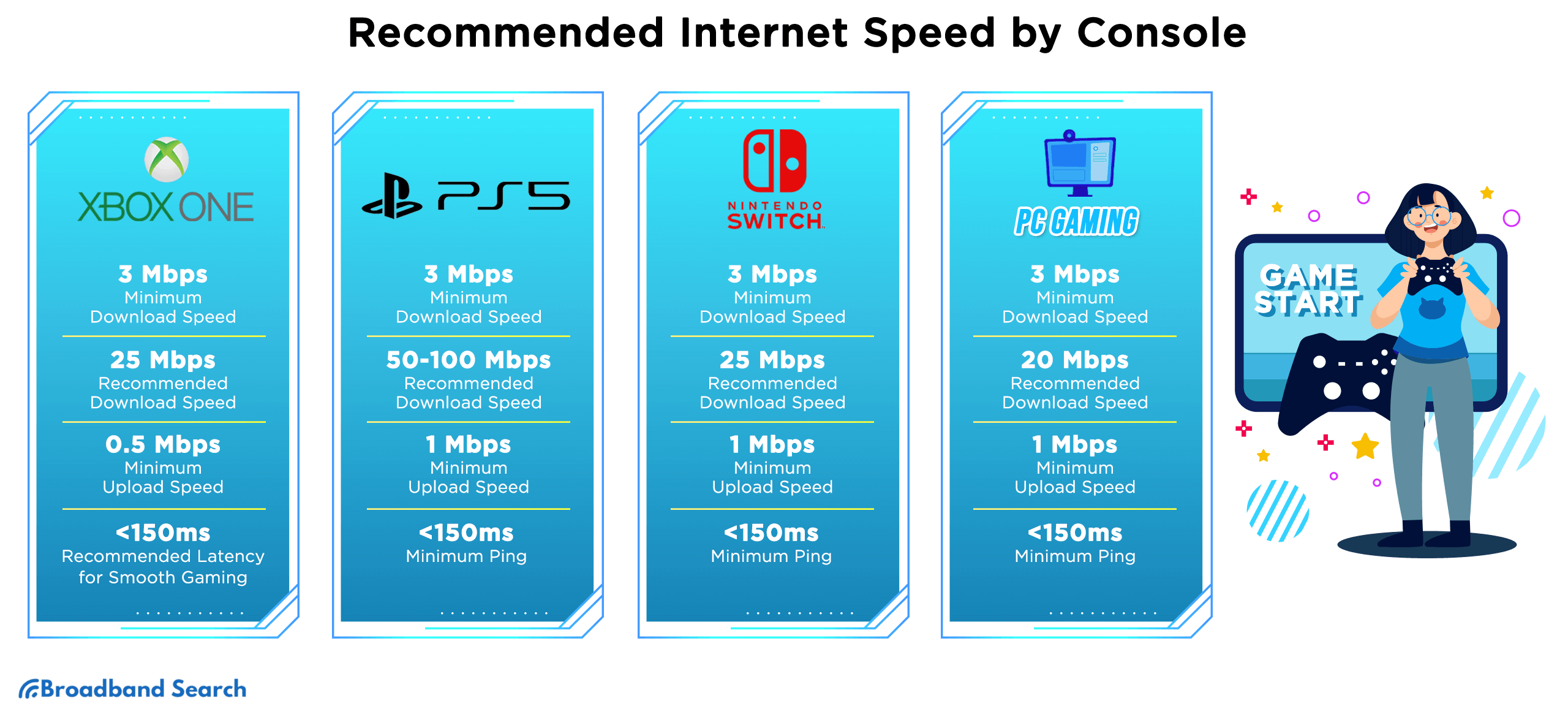
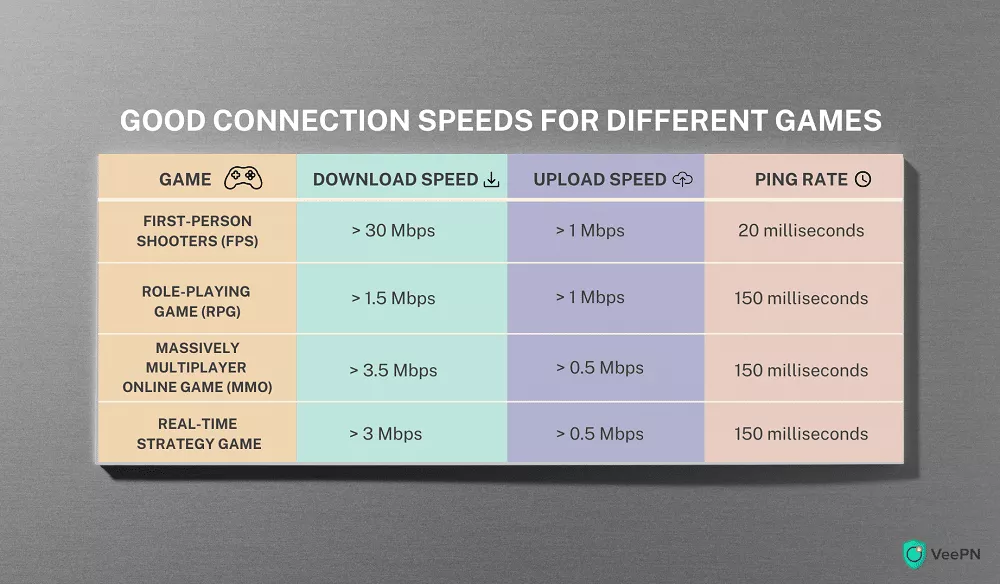
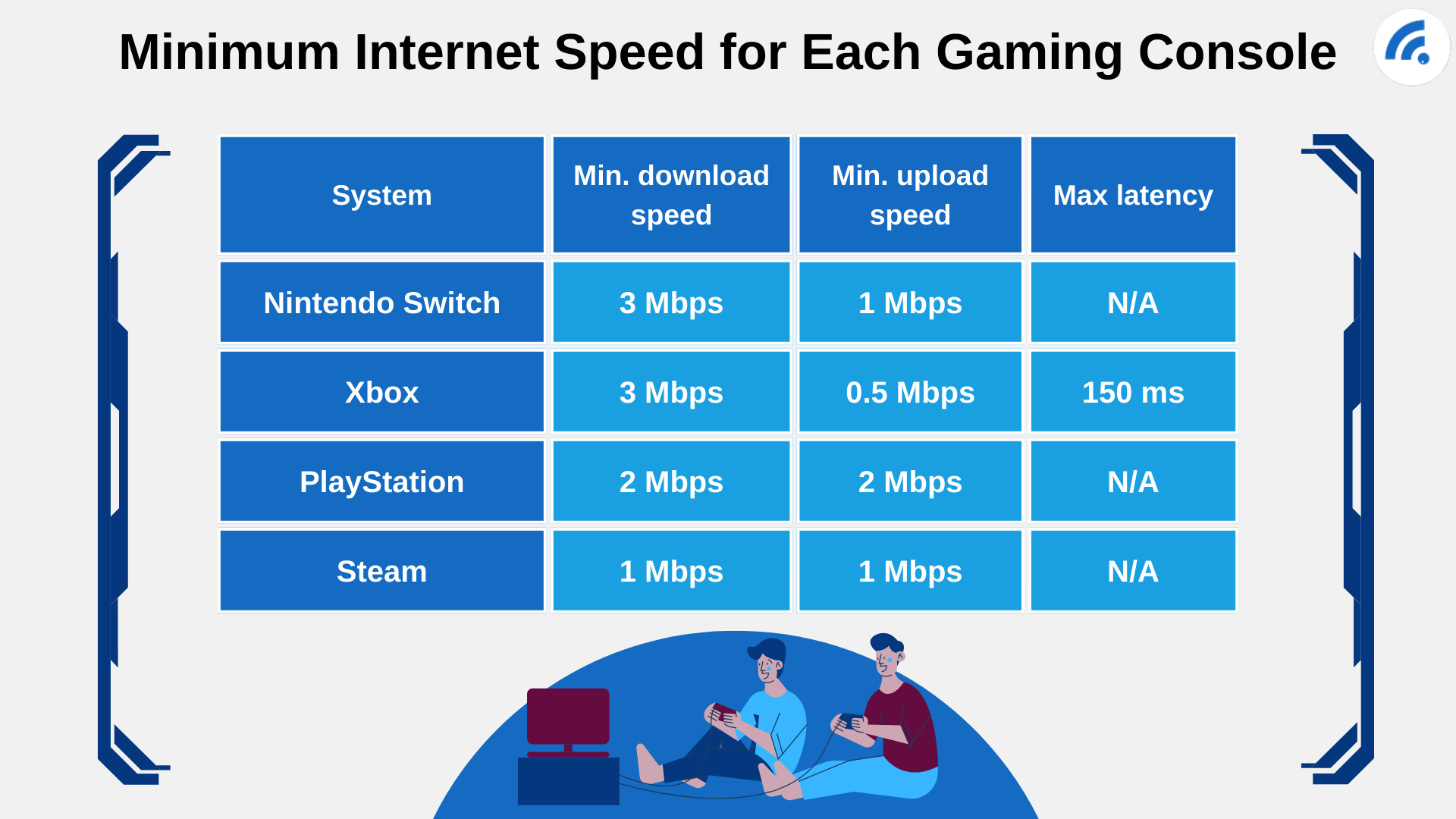
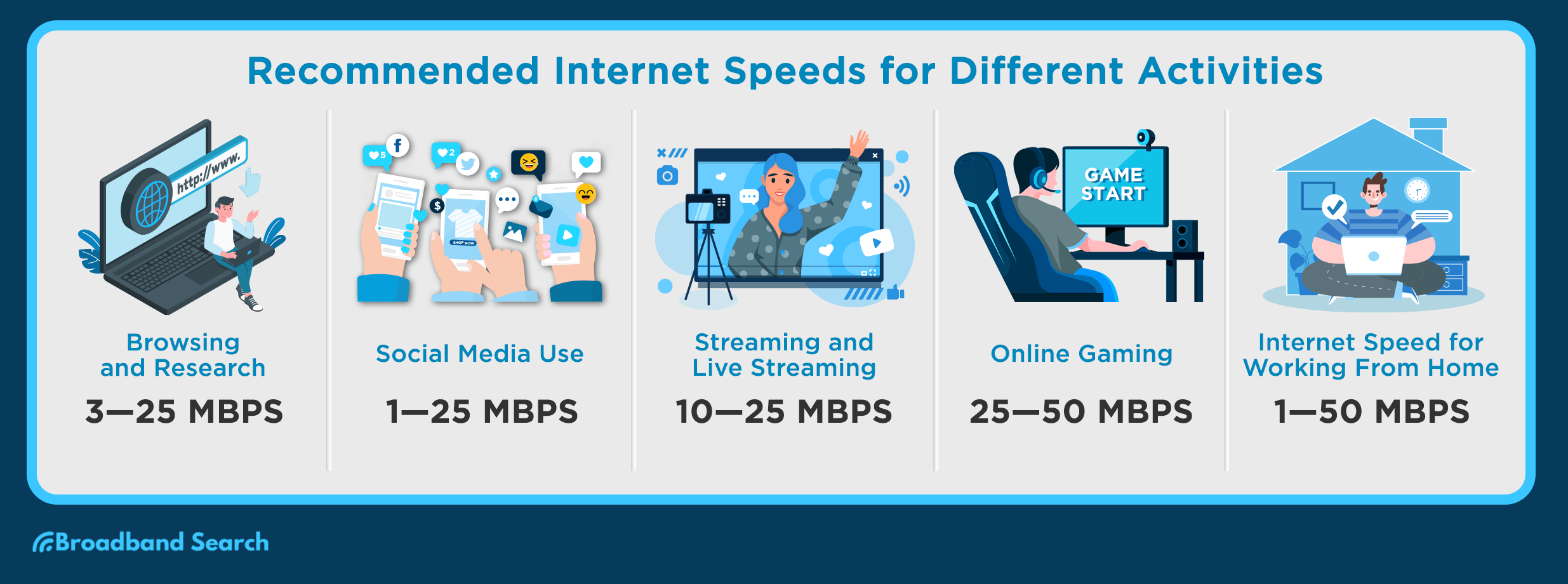
For most single-player focused gamers who occasionally dip into online multiplayer, a minimum of 1-3 Mbps upload speed is often sufficient for basic gameplay. However, if you are a competitive gamer, frequently play titles like Valorant, Apex Legends, or Call of Duty, or engage in social gaming trends like co-op adventures, you will want to aim for 5-10 Mbps for a truly smooth and responsive experience. This range provides a buffer against minor network fluctuations and allows for consistent data transmission, minimizing frustrating lag spikes during crucial moments. Anything less than 1 Mbps can lead to significant issues.
What Are the Common Symptoms of Low Upload Speed While Gaming?
Recognizing the symptoms of low upload speed can save you a lot of troubleshooting headaches. The most common indicators include persistent lag or high ping, even when your download speed is excellent. You might experience your character rubber-banding or teleporting, shots not registering despite clear hits, or general unresponsiveness. Another tell-tale sign is choppy, robotic, or cutting out voice chat, making communication with your teammates a nightmare. For those who stream, it manifests as frequent dropped frames, pixelated broadcasts, or outright disconnections from streaming platforms. These issues often cause immense frustration for gamers trying to balance life with their passion.
Does Upload Speed Impact Voice Chat and Streaming While Gaming?
Absolutely. Your upload speed is paramount for both voice chat and streaming. Voice chat applications, whether in-game or external like Discord, rely on a stable stream of outgoing data to transmit your voice to others. Insufficient upload bandwidth will cause your voice to break up, sound garbled, or disconnect entirely, hampering vital teamwork and social interaction. For content creators and streamers, the impact is even more severe. Streaming live gameplay requires sending a high-definition video feed, often 1080p at 60 frames per second, which demands significant and consistent upload bandwidth, typically 5-20+ Mbps. A weak upload connection will result in a poor-quality stream, frustrating both you and your viewers.
How Can I Test My Current Internet Upload Speed Accurately?
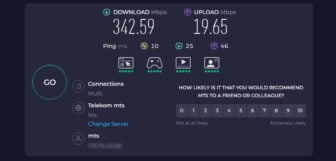
Testing your upload speed is a straightforward process. Use reputable online speed test websites like Speedtest.net by Ookla or Fast.com. For the most accurate results, ensure you perform the test on the device you game on, preferably connected directly to your router via an **Ethernet cable**. Disconnect other devices from your network and close any bandwidth-intensive applications running in the background. Run the test several times at different times of the day to get an average reading, as network congestion can vary. This will give you a clear picture of your actual upload capabilities and help diagnose if your internet plan is suitable.
What Factors Beyond Upload Speed Can Affect My Gaming Experience?
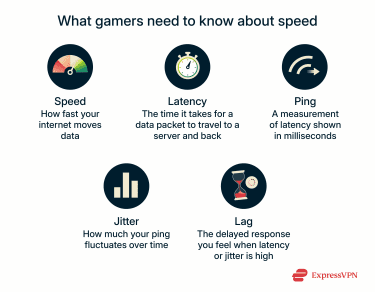
While upload speed is crucial, it is part of a larger ecosystem impacting your gaming. **Latency ping** is arguably even more critical; it is the time it takes for data to travel from your device to the server and back. Lower ping is always better. Other factors include your **router quality and placement**, which can introduce signal interference or bottlenecks, especially on Wi-Fi. **Network congestion** within your home or from your Internet Service Provider ISP during peak hours can also slow things down. Finally, your **gaming hardware** itself, from your PC's CPU and GPU to your console's internal storage, plays a significant role in overall game performance, independent of internet speed.
Tips for Optimizing Your Upload Speed for Better Gaming
Improving your upload speed does not always mean buying a new internet plan. First and foremost, always use a **wired Ethernet connection** if possible; it provides a more stable and faster link than Wi-Fi. Second, close any **unnecessary background applications or downloads** that might be consuming bandwidth, such as cloud backups or software updates. Third, check your **router's firmware** for updates and explore its Quality of Service QoS settings, which can prioritize gaming traffic over other data. Positioning your router centrally and clearing signal obstructions can also help if you must use Wi-Fi. Regularly rebooting your router can also clear minor glitches.
When Should I Consider Upgrading My Internet Plan for Gaming?
If you have implemented all optimization tips and still consistently face lag, poor voice chat quality, or struggle to stream your gameplay effectively, it is likely time to consider an internet plan upgrade. Especially if your household has multiple users streaming 4K content, video conferencing, or downloading large files while you game, a higher upload speed becomes essential. Look for plans with more symmetrical speeds, meaning the upload speed is closer to the download speed, or specifically higher guaranteed upload bandwidth. This investment can significantly enhance your gaming experience, making it a valuable decision for busy gamers looking for relaxation and fun.
How Does My Gaming Setup Influence My Internet Connection?
Your gaming setup can subtly influence how effectively your internet connection performs. For PC gamers, an **older network adapter** on your motherboard might not support the full speeds your ISP provides. For both PC and console users, using **Wi-Fi over Ethernet** introduces latency and potential packet loss, regardless of your theoretical speed. The physical distance from your router and obstacles like walls can severely degrade Wi-Fi signal quality. Even the **operating system** and **background processes** on your device can consume bandwidth or processing power that impacts your online performance. Ensuring your setup is optimized for networking is as important as having a good internet plan.
Understanding the role of upload speed in your gaming life is more important than ever in 2026, with social gaming and cross-play dominating trends. It is not just about avoiding frustration; it is about maximizing your enjoyment, staying connected with friends, and making the most of your valuable gaming time. By taking a few moments to assess your current setup and implement some of these tips, you can transform a stuttering, laggy experience into a smooth, responsive adventure.
Remember, a great gaming experience is a balance of many factors, and a robust upload speed is a foundational piece of that puzzle. You do not need to be a tech wizard to achieve it; just a little knowledge and some practical adjustments. What is your biggest gaming challenge when it comes to internet speed? Comment below and let us help each other level up our connections!
How much upload speed is good for gaming?
For most online multiplayer games, 1-5 Mbps upload speed is sufficient for a smooth experience without streaming. If you plan to stream your gameplay or engage in heavy voice chat, aim for 10-25 Mbps or higher to avoid performance issues.
Why is my upload speed slow for gaming?
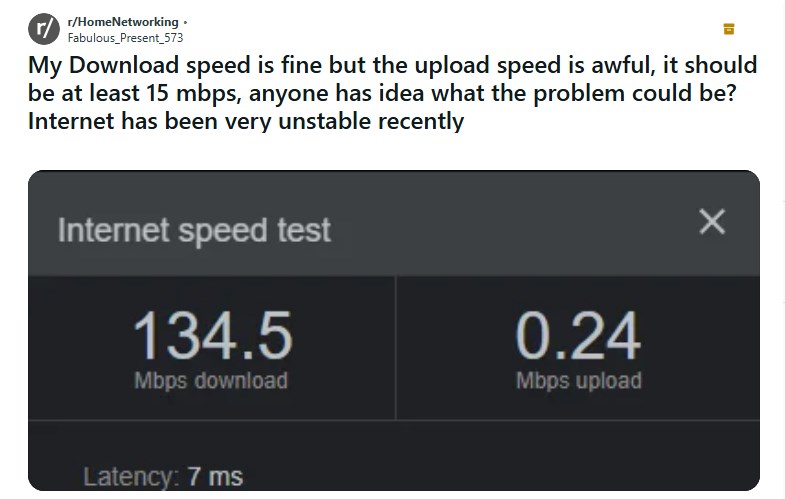
Your upload speed might be slow due to several factors including an outdated router, using Wi-Fi instead of Ethernet, background applications consuming bandwidth, network congestion on your home network or ISP, or simply an internet plan that offers very low upload capacity.
Can a good download speed compensate for bad upload speed in gaming?
No, a good download speed cannot compensate for a bad upload speed in interactive online gaming. While download speed lets you receive game data, upload speed is crucial for sending your actions. A bottleneck in upload will still cause lag and unresponsiveness, even with blazing fast download speeds.
Does upload speed affect ping?
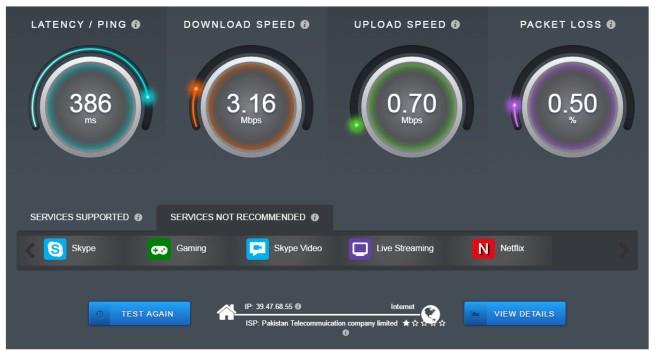
Yes, while not the only factor, insufficient upload speed can contribute to higher ping latency. When your connection is struggling to send out data, it adds to the round-trip time for information to reach the game server and return, directly impacting your ping and overall responsiveness in games.
What is packet loss and how does upload speed relate to it?
Packet loss occurs when data packets fail to reach their destination. While various network issues can cause it, a low or unstable upload speed can exacerbate packet loss, particularly when your system is trying to send a lot of data at once. This leads to missing game information, causing hitches and desynchronization.
Internet upload speed is vital for smooth online gaming especially for actions like sending game data voice chat and streaming. Low upload speed causes lag desync and poor communication. Modern multiplayer games require a stable upload connection. Ideal upload speed for gaming without streaming is 1-5 Mbps. For streaming while gaming 10-25 Mbps is recommended. Optimize your connection by using wired Ethernet checking background apps and upgrading your internet plan if necessary. Understanding upload speed helps maintain a balanced gaming life.
35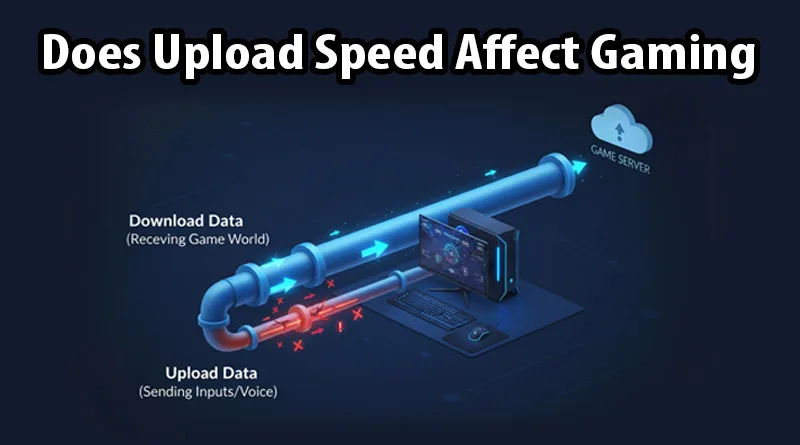
Truth Exposed Does Upload Speed Affect Gaming And Streaming Does Upload Speed Affect Gaming. Internet Speed For Gaming How Fast Do You Really Need Internet Speed For Gaming 2 375x270 . What Is A Good Upload And Download Speed For Online Gaming Dibujos G1 . What Is A Good Internet Speed For Gaming VeePN Blog Pasted Image 0 23.webp. What Is A Good Internet Speed For Gaming VeePN Blog Pasted Image 0 21 1.webp

What Internet Speed Is Recommended For Gaming Infographic 1 1024x576 . What Is The Best Internet Speed For Gaming Update 05 2026 Best Internet Speed For Gaming Img . Broadband For Gaming At Horace Gant Blog 2. Minimum Internet Speed For Each Gaming Console . What Games Use The Most Bandwidth 1 768x616 . A Guide To Internet Speeds G5 Recommended Speed

What Is A Good Internet Speed For Gaming Good Internet Speed For Gaming. What Is A Good Internet Speed For Gaming 2026 Cable TV Info What Is A Good Internet Speed For Gaming 1024x683 . Bandwidth Vs Internet Speed The Differences Explained 1. The Minimum Internet Speed You Need . Internet Upload Speeds Explained What Are Symmetrical Broadband. Internet Speed For Gaming How Fast Do You Really Need Internet Speed For Gaming 3 375x292


The Speedtest Guide To Fast And Responsive Mobile Gaming 06 Speedtest . How Does Internet Speed Affect Online Gaming Experience YouTube . What Is A Good Upload Download Speed For Gaming Games Fuze What Is A Good Speed For Gaming Speedtest . What Is A Good Internet Speed In 2026 For Browsing Streaming Gaming What Is A Good Internet Speed For Browsing Streaming Gaming 1 . Blog Resources Featured

What Fibre Speed Do I Need For Netflix Gaming And Streaming Streaming Chart . Supercharge Your Internet Tips Amp Tricks Internet Speed Statistics . Average U S Internet Speeds By State In 2026 TMS Blog Graphic U.S. States With The Fastest And Slowest Internet Speeds In 2025 1024x683 . Upload Speed Very Slow 6 Steps To Diagnose And Fix It 1U7gdh Mceclip0 . Key Gaming Trends Of 2026 TREND
)

Average U S Internet Speeds By State In 2025 Download Upload Speeds Featured Graphic . Network Jitter Causes Effects How To Fix It TestMySpeed Internet Speed Test Results Explained . What S A Good Internet Speed For Gaming 2026 Guide Virgin Media O2 Filters Quality(75). Internet Speed Explained Download Upload Latency TestMySpeed Com How Internet Speed Affects Streaming Quality Featured Graphic . Truth Exposed Does Upload Speed Affect Gaming And Streaming Best Gaming Headset 2026 Hero

Best Latency For Online Gaming Ping Jitter Packet Loss FreeISPInfo What Is A Good Internet Speed For Gaming. Ranked Countries With The Fastest Mobile Internet Speeds Visual Fastest Internet Speeds 2024 02 VORO 600x800 . Fastest VPN Service 2026 Best Download And Upload Speeds Native Speed Test 336x161 . Download Speeds For 3G 4G And 5G Download Scientific Diagram Download Speeds For 3G 4G And 5G . What Internet Speed Do I Need For Gaming And Streaming Techprim Com Internet Speed Required For Gaming